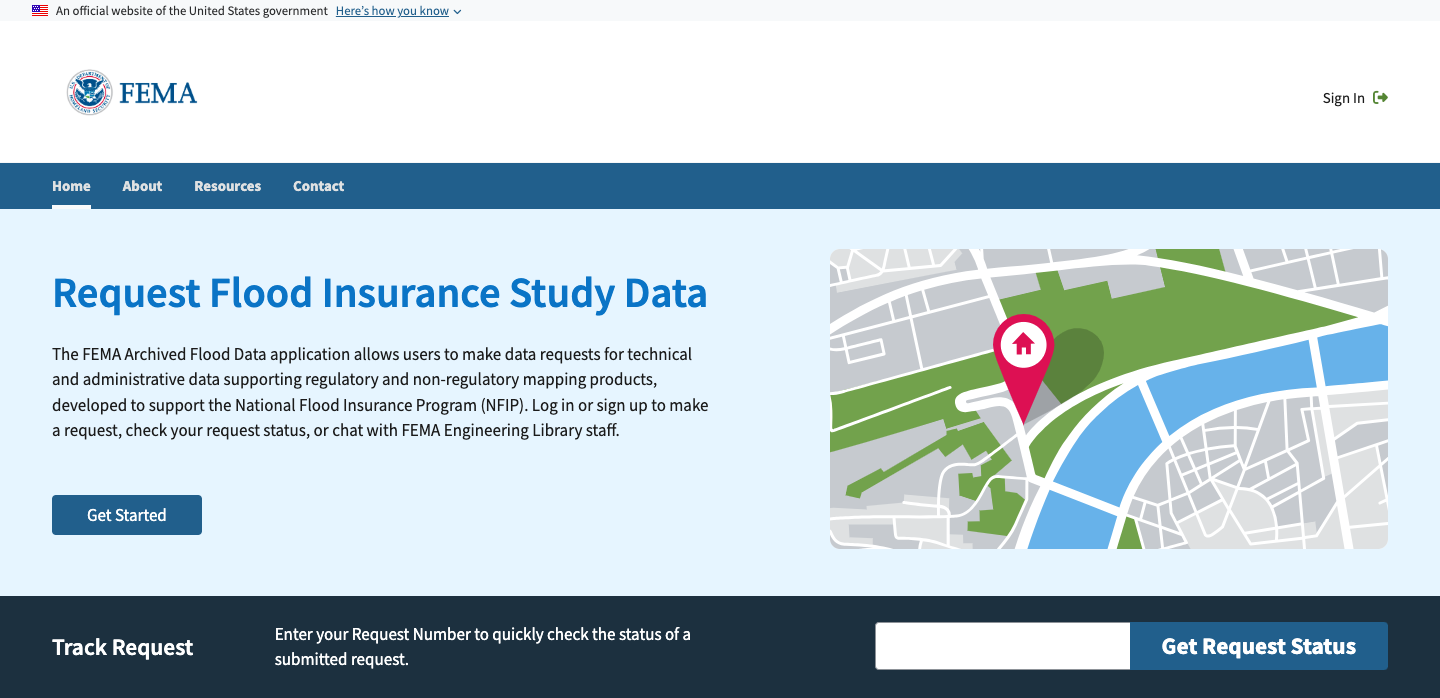
Archived Flood Data
Modernizing a manual data management and archival service to a digital experience both customers and staff.
Design Systems ~ User Research ~ Information Architecture ~ Interaction Design ~ Prototyping ~ User Testing
Overview
Role: UX Researcher & Designer
Client: Federal
Deliverables: Discovery Research Artifact, User Interview Guide and Findings, High Fidelity Prototype with Design Documentation
Tools: Microsoft Office, Mural, Jira, Confluence, Adobe XD, Figma
Team Collaborations: Business Analyst, Architect, DevOps, Stakeholders, Data, and Communication
Archived Flood Data is responsible for data management and archival services as well as distribution of data through various request processes. At the time this service was provided through downloading a form to mail, track through email and organized in excel sheets. This service is used nationwide yet receives almost 2000 inquiries yearly around how to request data.
The challenge, due to unfamiliarity with the process, complexity of the service, and the outdated request submission procedure, it’s not always clear to users how to find the service, successfully request data, and tract their request data.
My role in this effort was to lead the user research and testing effort, design a new digital ordering system that allow customers to easily find the service, request mapping documents and data, and track the progress of their request.
Outcome, the general public has access to the site, Archived Flood Data, to access this service without having to physically download a form to mail. The staff member can connect with customers via site with features that allowing tracking for both customer and staff.
Discovery
My discovery approach:
Understand project goals
Review existing process and system documentation
Plan and conduct stakeholder interviews
Plan and conduct design thinking workshop
Analyze and document relevant processes and information
Create user personas, user flows, and journey maps
Identify findings and recommendations
Document questions for user testing preparation
Propose design priorities
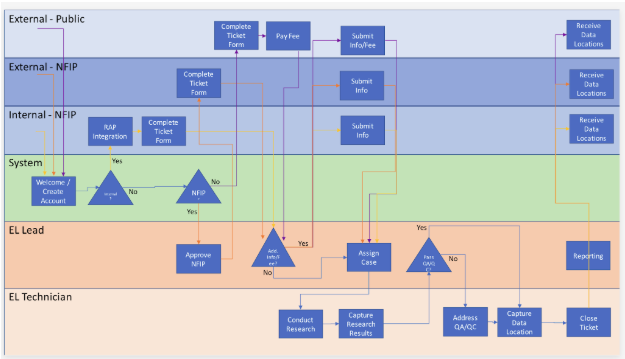
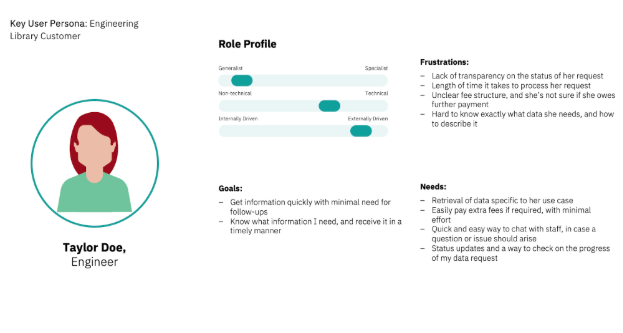
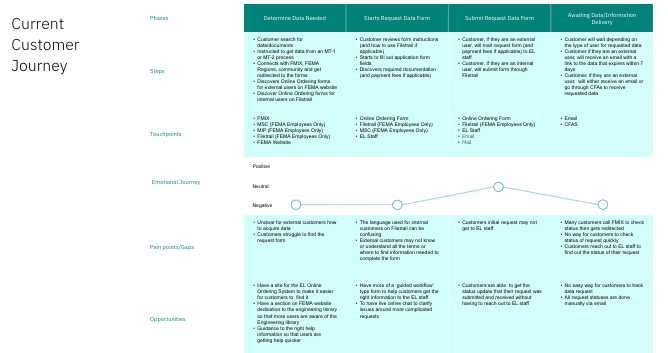
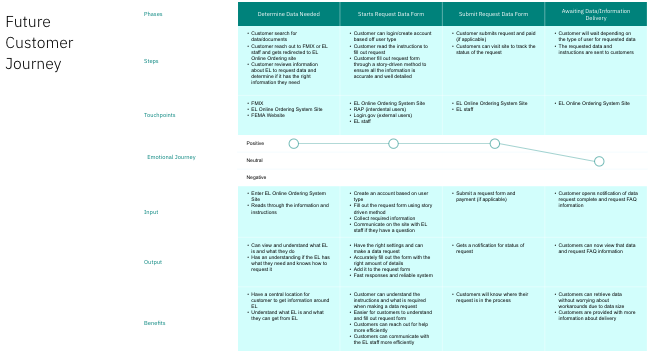
Although customers are provided with the updates via email, they tend to get lost.”
— Stakeholder InterviewFrom these set of activities, these were the Design Priorities
Theme: Digitalization & Process
Insight: This tool uses outdated systems and manual processes, relying heavily on workarounds hindering stakeholders in completing their task
Opportunity: Digitalize processes and enable more efficient workflow to enhance customers in requesting data, and the staff team delivering data
Theme: Error Prevention & Communication
Insight: The content does not provide the right level of detail and explanatory language for users to follow and understand
Opportunity: Provide plain language and clear instruction to enhance communication and prevent errors between customers and the staff team
Theme: Visibility & Discoverability
Insight: Issues around discoverability and lack of digital capability impact the ability to meet the needs of customers searching for data and information
Opportunity: Create a site/application to increase visibility and awareness around the Archive Flood Data to assist customers in finding the information they need
Ideation & Design
Ideation
During this part I focused on user needs, technical requirements and business needs to figure out how they translate in design. From there, I started to create a site map, list ideas of what should be included, and sketched out low fidelity wireframes for both staff and customer. Taking the list of ideas, I groups it into three sections: Cupcake (MVP), Birthday Cake (Backlog items), Wedding Cake (Future enhancements). This allowed stakeholders to reimagine how the process could impact customer in a positive light.
Potentail Features:
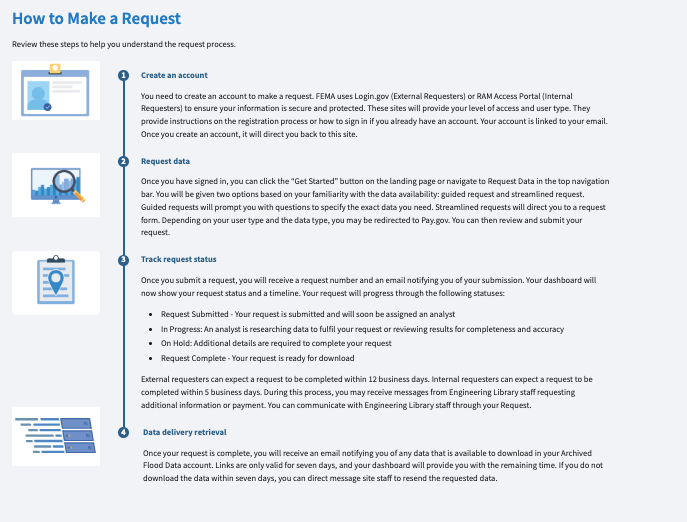
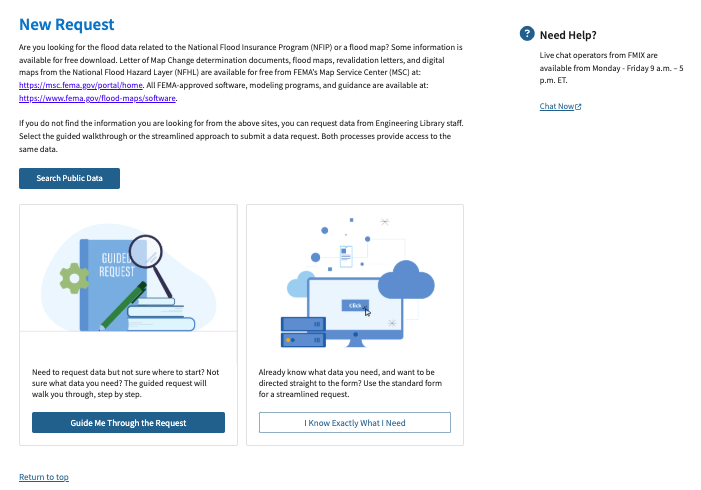
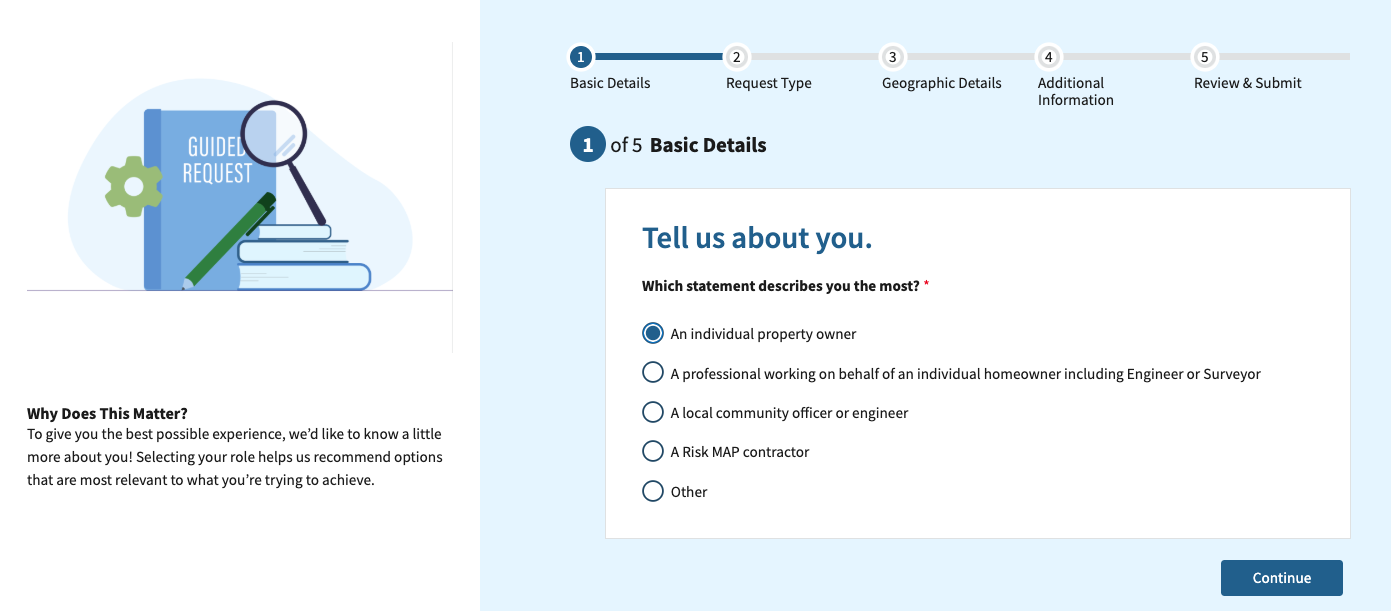
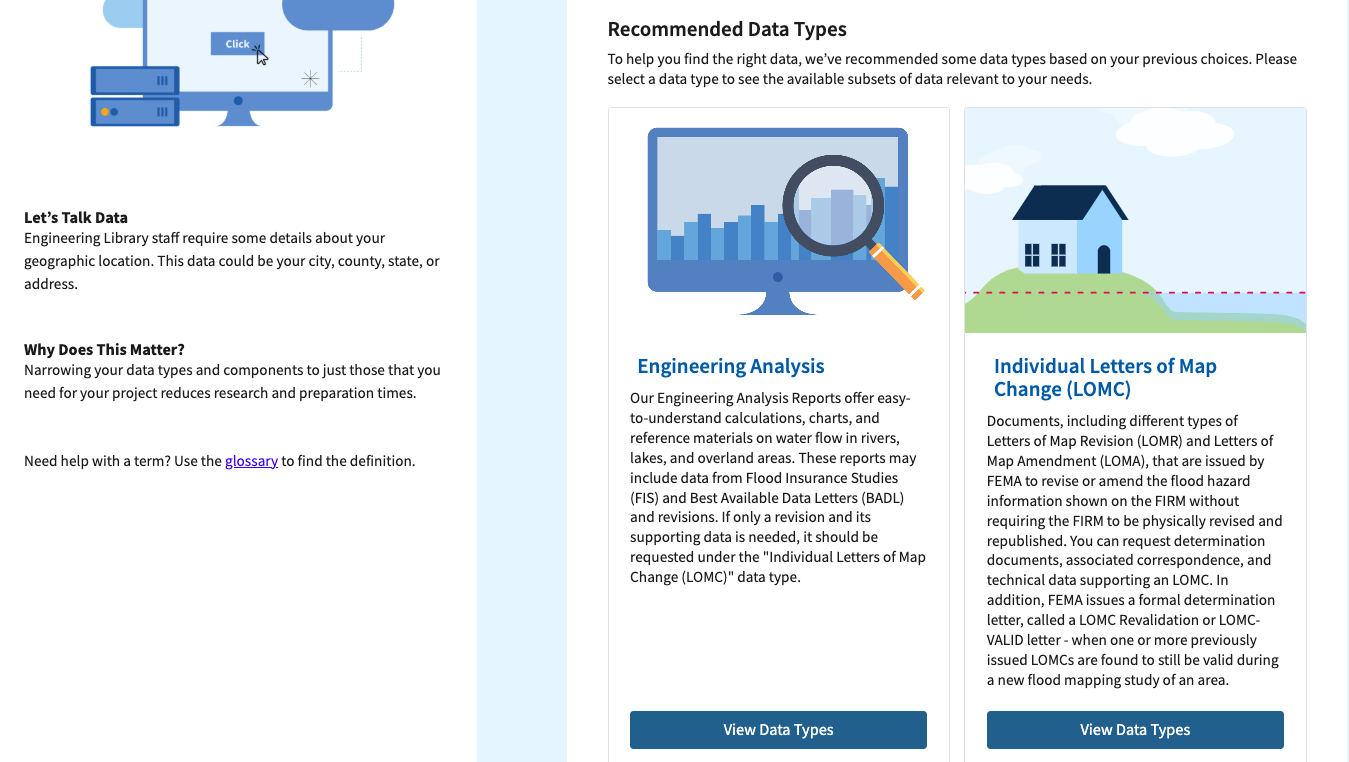
Two ways to request data. One for super users that is streamlined but provides additional support as needed. Another that is guided for less familiar or one time customers, that is broken into sections, suggest data options, and intentional information.
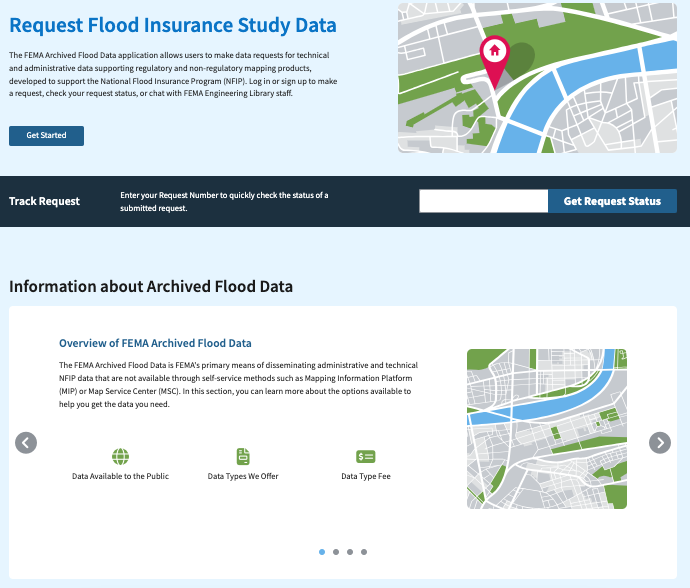
A way to search your request status without logging in, similar to USPS. This way customers can check the status of their request quickly.
Utilizing a drawer component, similar to e-commerce with the cart icon allowing customers to see which items they have selected.
Glossary component using a book icon to search up technical terms and understand what is used during a step in the request process.
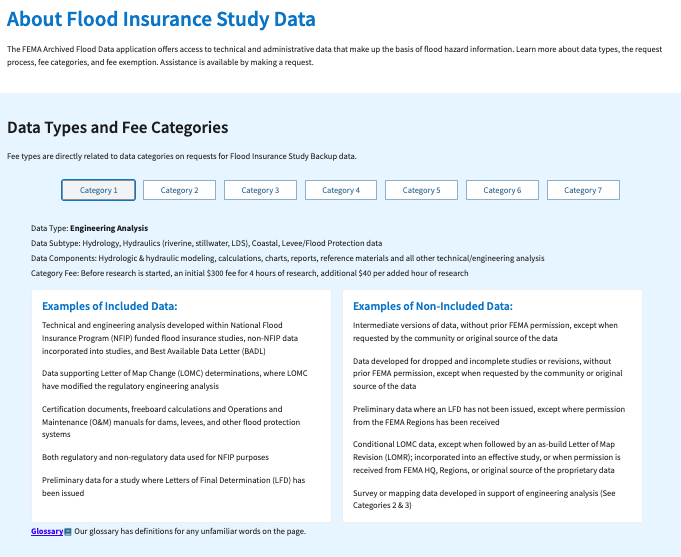
Present technical heavy information in a way that was digestible for the average user. This can be done using a carousel or smart tabs, allowing for progressive disclosure.
Reasoning Behind the Features Decision
Although my team and I came up with a lot of ideas, during the design iteration and various stakeholder we realized some ideas were not making the cut.
First thing I looked back on was the requirements. Did this fit into MVP or was this a future feature. For example, although the glossary component has a lot of benefit ti was outside of the cost and technical scope. Luckily, I was able to frame it as a potential enhancement for the future, so it was added to the backlog.
A feature that was completely scraped was the add to cart or draw component. The idea seemed nice and we were able to add the component to the library. When came time for user testing, it felt repetitive for users and unnecessary when my team and I evaluated it.
Another idea that our client liked was the check your status. By ensure no user personally information was shown and simplifying the tracking statuses into 3 stages this feature was added into the final product.
Design
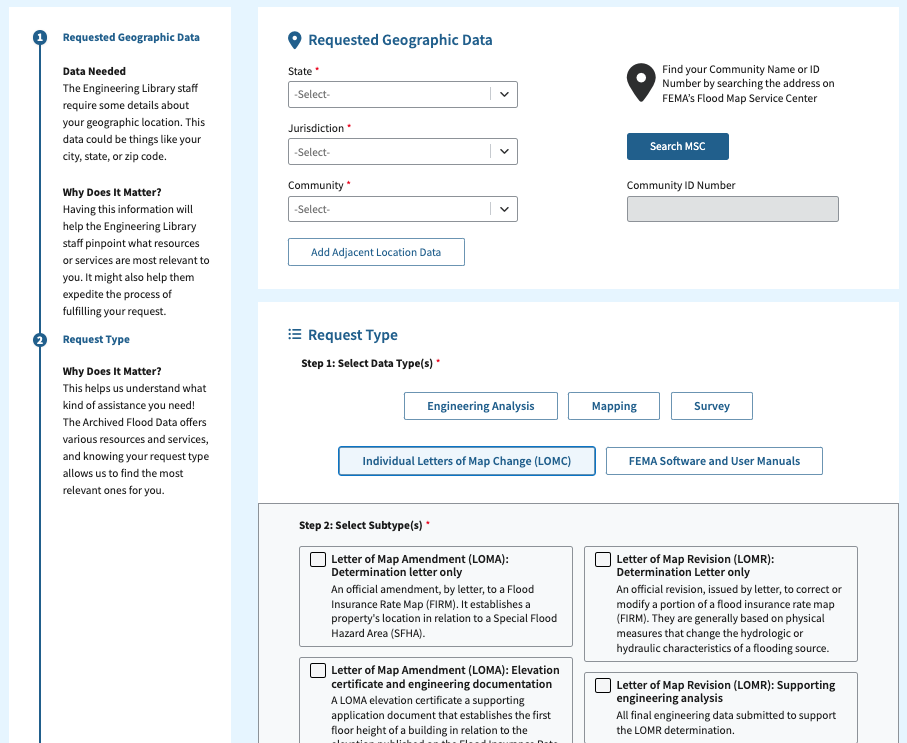
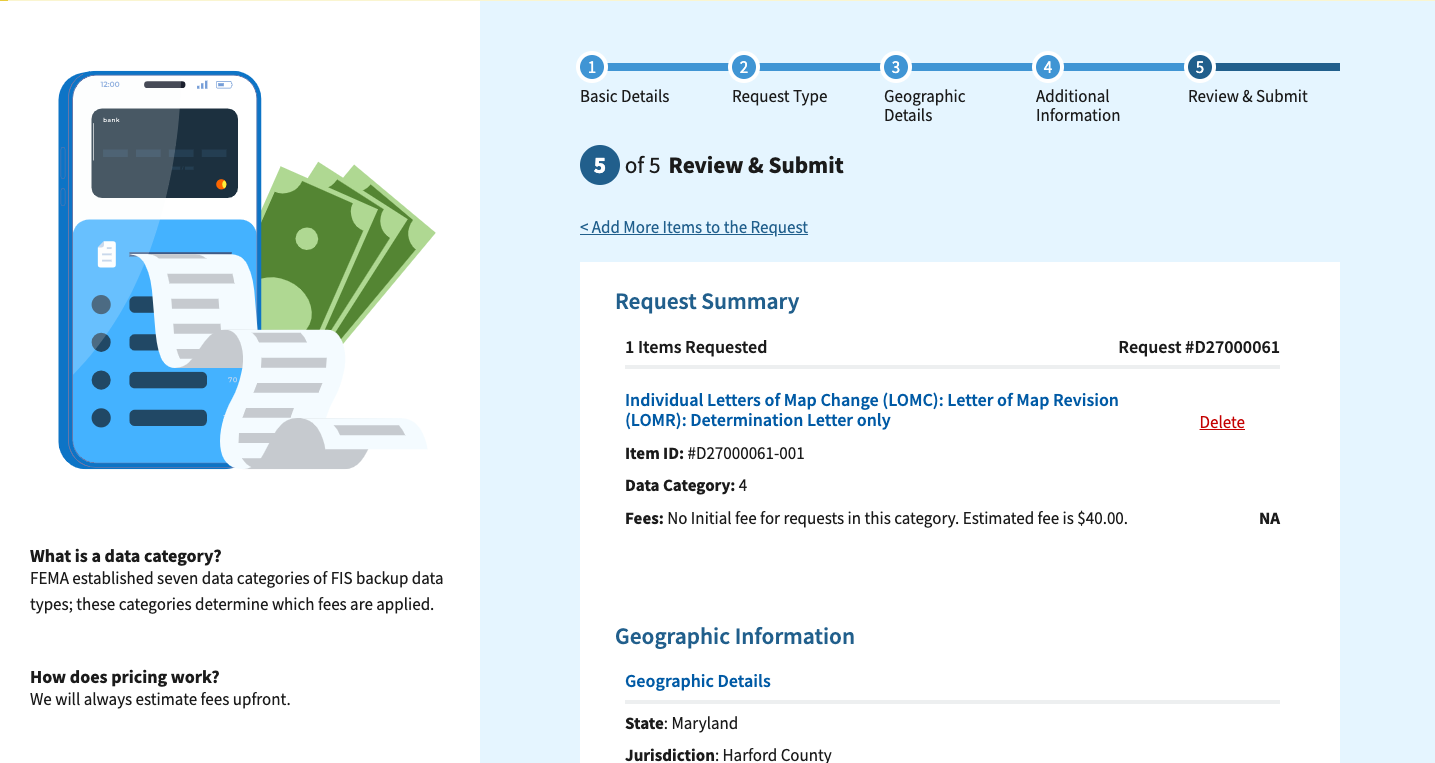
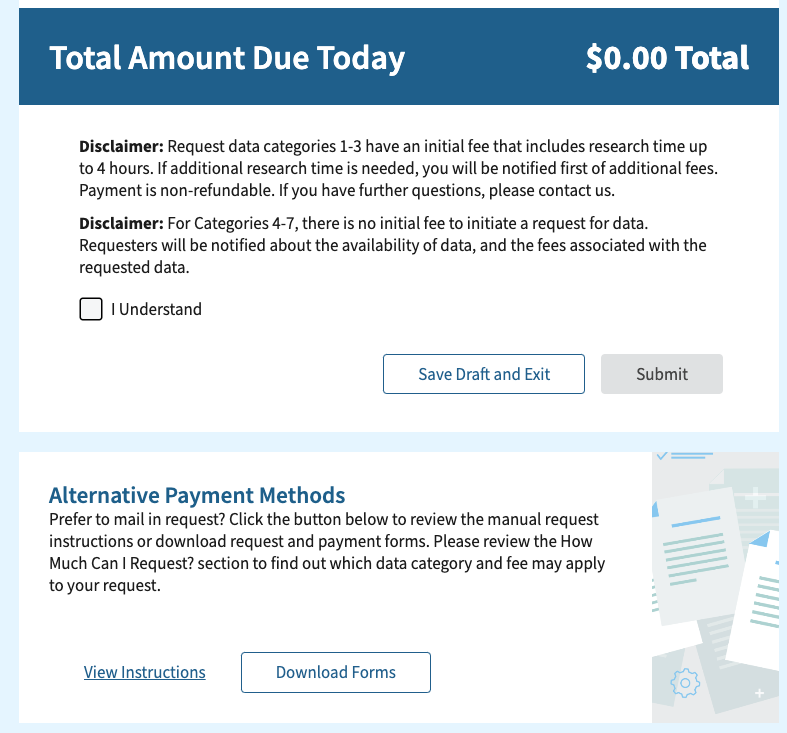
I primarily focused on the customer designs specifically from the informational pages and creating the ordering process. The main techniques I used were information architecture, visual hierarchy, layout and interaction design. From there the design process was iterative, every week taking wireframes transforming it to high fidelity mock ups section by section. This cadence allowed us to obtain quick feedback to continue our iteration process smoothly
User Testing
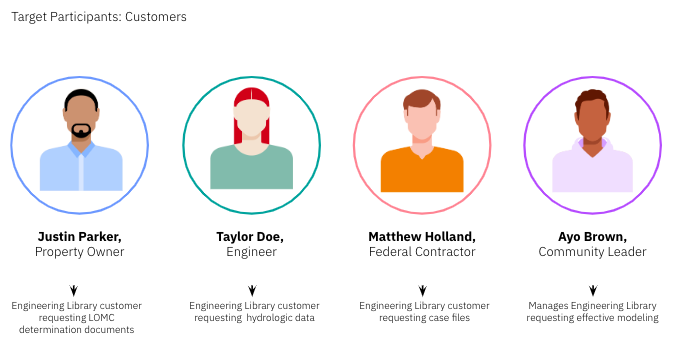
While creating the designs from low to high fidelity wireframes, I began to focus on what is needed and whether the customer will understand it. This allowed me to create a list of questions based on each area of design.
Once the customer designs were in a good place, we did user testing to gather insight and continue refining the user flow based on user feedback.
To hold this study, we created a research plan focus on collected qualitative and quantitative data to answer several research questions including:
Processes and Workflow
How well does the new digitize processes improve customer journey and staff’s workflow? Are there any new pain points?
Branding and Discoverability
Does the name of the site match customers expectations? Does the name match what the site offers?
Layout and Visual Design
What are users’ overall impressions of the site? Did the layout make it easy to read and understand?
Content and Information Architecture
Understand whether customers have all the information they need to be successful in their tasks. Is the content in the right place? Do users understand the content?
Outcome and Takeaways
Outcome:
Within the first month of launching the staff had wonderful news to share on the process and transparency this service now has thanks to the new service website. The team will continue to monitor traffic through google analytics.
Future enhancements, to add a feedback tool to the site to gather user feedback in real time to address any bugs or issues.
Takeaways:
The biggest takeaway from this project was collaborating with multiple cross functional teams. Communication played a huge role in understanding what user need, ensure all teams have access to the data and information, and staying on top of everyones work.
Another area was around scope, especially understanding MVP while staying in scope and when to say no or propose a future enhancment. It’s fun to add and suggest new functionality and innovations but if we do not have the technical capacity nor the understand the cost, it hinders the entire process.